
Available on the Corporate plan. This functionality is part of woku’s enterprise capabilities. Talk with our sales team.
This guide applies only to the v1 version of the API. It corresponds exactly to the API Reference tab you see at the top of the documentation. For the historical behavior (routes without the
/v1/ prefix), switch the version selector to v0.Interactive reference
The entire API is documented interactively in the API Reference tab of this same documentation. There you can view each endpoint with its full schema, run it live from the browser and copy examples in your preferred language. This guide is complementary: it explains the flow and the “why” of each call so that the integration takes you as little time as possible.Introduction
The woku API lets you operate all feedback tools programmatically: wokus, NPS, CSAT, CES, forms and flows, as well as invitations, quarantines, external trackers, ticket destinations and action plans. The typical use cases:- Create wokus automatically when an event occurs in your application (for example, closing a sale, ending a training session, delivering a product).
- Capture responses directly from your interface or backend, without redirecting the customer to the woku site: woku ratings and reviews, NPS, CSAT and CES scores, and form responses.
- Send surveys by email or WhatsApp to recipient lists from your backend.
- Capture feedback from your mobile app with a single idempotent endpoint, designed for the React Native SDK.
- Tag tools with identifiers from your systems (CRM, ERP, ticketing) to later search across them.
- Extract responses and reports into your dashboards and internal systems.
- Configure where support tickets land (Zendesk, Salesforce, Slack, your own service or email) and how they are routed based on your trackers.
- Manage AI-generated action plans: approve them, send them to Jira, monday.com, ClickUp or Notion, or work them inside woku.
multipart/form-data and respond with consistent structures.
Base URL
/v1/ prefix.
Authentication
Every company registered in woku has a Company Key that is included in theAuthorization header of each request:
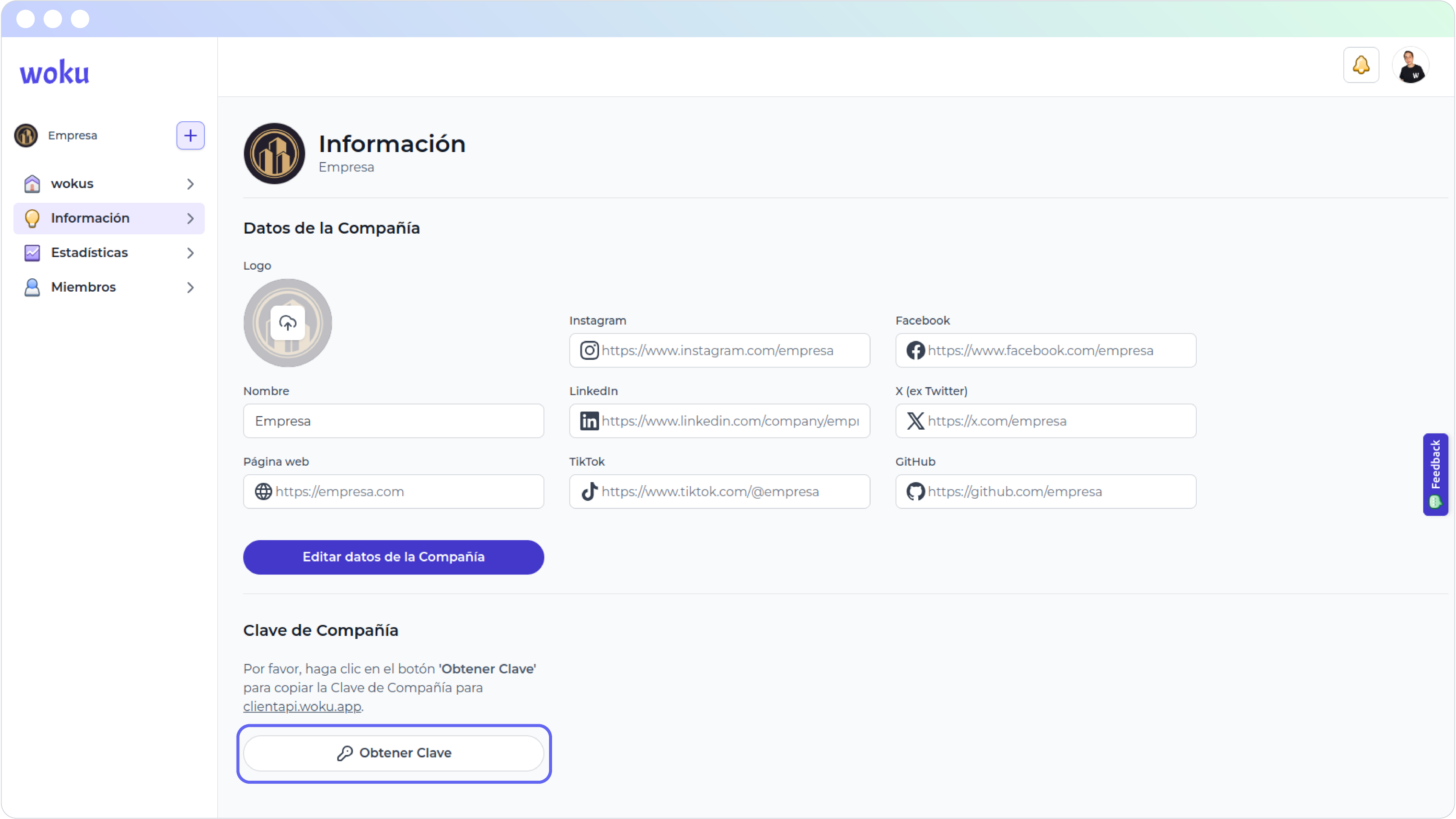
View of the company information window.
Company
Get the current company
Retrieves the data of the company associated with the Company Key. Useful to validate that your integration is authenticating with the correct account. EndpointAuthorization: Bearer <Company-Key>
200 OK: Returns the company object.403 Forbidden: The key is not valid or has no permission.
Wokus
The wokus functions let you create, query, rate and share wokus programmatically.Create a woku with a file URL
Creates a woku using an image or video hosted at a public URL (CDN, S3, ImageKit, etc.). EndpointContent-Type: application/jsonAuthorization: Bearer <Company-Key>
description(string, required): Between 3 and 140 characters.fileUrl(string, required): Public URL of an image or video (preferably.mp4).folderSecondaryKey(string, optional): Key of the folder where the woku is stored.parentFolderSecondaryKey(string, optional): Key of the parent folder. It cannot be the same asfolderSecondaryKey.clientEmail(string, optional): Email of the associated customer.clientPhone(number, optional): WhatsApp number.
201 Created: Returns the created woku object.400 Bad Request: The body did not pass validation.403 Forbidden: Invalid key.
Create a woku with a file (multipart)
When the file is in your own storage or your client uploads the image directly from a form, use the endpoint withmultipart/form-data.
Endpoint
Content-Type: multipart/form-dataAuthorization: Bearer <Company-Key>
file(binary, required): Image or video file.description(string, required): Between 3 and 140 characters.folderSecondaryKey(string, optional).parentFolderSecondaryKey(string, optional).clientEmail(string, optional).clientPhone(string, optional).
201 Created: Woku created.400 Bad Request: Validation failed (file format, size, required fields).403 Forbidden: Invalid key.
Get the data of a woku
Retrieves the woku along with its ratings and reviews. EndpointAuthorization: Bearer <Company-Key>
id(string, required): Woku identifier.
200 OK: Woku object with its reviews.403 Forbidden: Invalid key.404 Not Found: No woku with that ID exists in your company.
List the company’s wokus
Paginated list of your company’s wokus. Endpointpage(number, optional): Defaults to 1.limit(number, optional): Defaults to 20.
200 OK: Paginated list of wokus.403 Forbidden: Invalid key.
Get a woku with statistics
Returns a woku with its aggregated review statistics. Endpoint200 OK: Woku with statistics.403 Forbidden: The woku belongs to another company.404 Not Found: The woku does not exist.
List the reviews of a woku
Text and audio reviews, paginated, from most recent to oldest. Audio reviews expose their transcription. Customer contact data is never included, onlyclientId.
Endpoint
page(number, optional).limit(number, optional).
200 OK: Paginated list of reviews.403 Forbidden: The woku belongs to another company.404 Not Found: The woku does not exist.
Rate with a text review
Adds a rating of 1 to 5 stars with a written comment. EndpointContent-Type: application/jsonAuthorization: Bearer <Company-Key>
qualification(integer, required): Value between 1 and 5.description(string, required): Text review, maximum 3000 characters.clientEmail(string, optional): If not provided,anonymousmust betrue.clientPhone(number, optional).anonymous(boolean, optional): Defaults tofalse.
201 Created: Review recorded.400 Bad Request: Validation failed.403 Forbidden: Invalid key.404 Not Found: The woku does not exist.
Rate with an audio review
Upload an audio file along with the rating. EndpointContent-Type: multipart/form-dataAuthorization: Bearer <Company-Key>
file(binary, required): Audio. Recommended.mp4or.wav.qualification(string"1","5", required).clientEmail(string, optional).clientPhone(string, optional).anonymous(string"true"or"false", optional).
201 Created: Review recorded.400 Bad Request: Validation failed.403 Forbidden: Invalid key.404 Not Found: The woku does not exist.
Share a woku by email
Sends the woku to one or more recipients. It is the same flow that starts from the share interface. EndpointContent-Type: application/jsonAuthorization: Bearer <Company-Key>
200 OK: Send queued.400 Bad Request: Validation failed (malformed email, both fields empty, etc.).403 Forbidden: Invalid key.
Mobile SDK captures
A single ingestion endpoint designed for the React Native SDK. It receives a normalized capture and routes it according to itskind: woku (a woku review), nps, csat or ces. The response channel is sealed as mobile-sdk on the server side.
Endpoint
application/json: text or rating captures. The body is the capture.multipart/form-data: captures with audio. The file goes in thefilefield and the capture as JSON in thepayloadfield. Audio is available forwokuandnps; audio comments are not yet supported forcsatorces.
id(string, optional): Identifier generated by the client. It is used as the idempotency key.kind(string, required):woku,nps,csatorces.targetId(string): Id of the woku (required forwoku), of the NPS Tool (optional fornps) or of the CSAT/CES Tool (required forcsatandces).rating(integer, optional): Woku rating, from 1 to 5.score(integer, optional): NPS score from 0 to 10, or CSAT/CES from 1 to 5.comment(string, optional, max 3000): Text comment. Required in text captures of a woku.respondent(object, optional):email,phone,externalId. Without an identifier, the capture stays anonymous.
X-Woku-Idempotency-Key header or, in its absence, from the id field of the body. If the same send is retried (for example, by the SDK’s offline queue), the API returns the already-recorded result instead of creating a duplicate.
Responses
201 Created: Capture accepted. Returnsid,kind,remoteIdandstatus: "accepted".400 Bad Request: Validation failed (missingtargetId, audio incsatorces, malformedpayload).403 Forbidden: Invalid key.
NPS responses
You can capture NPS scores and extract individual responses into your systems. Aggregated reports are in the NPS Reports section.Capture an NPS score
Endpointscore(integer, required): From 0 to 10.npsToolId(string, optional): Specific NPS Tool. If omitted, the score is recorded at the company level.clientEmail(string, optional): If not provided, the response stays anonymous.anonymous(boolean, optional).responseChannel(string, optional, max 48): Response channel. Defaults toapi.
201 Created: ReturnsnpsIdand the response object.400 Bad Request: Validation failed.403 Forbidden: The NPS Tool does not belong to your company.
Add a review to an NPS score
Once the score is created, you can attach an optional text or audio review to it. Endpoints- Text: JSON body
{ "description": "..." }, maximum 3000 characters. - Audio:
multipart/form-datawith the file in thefilefield (m4a, aac or mp4). The transcription is generated on the server.
201 Created: Review attached.400 Bad Request: Validation failed.403 Forbidden: The NPS belongs to another company.404 Not Found: The NPS does not exist.
Query NPS Tools and responses
Read endpoints to bring NPS data into your systems:GET /v1/nps-tools: Paginated list of your company’s NPS Tools.GET /v1/nps-tool/:id: Definition of an NPS Tool (to build the question).GET /v1/nps: Paginated responses, from most recent to oldest.GET /v1/nps/:id: An individual response.
GET /v1/nps accepts the filters npsToolId, from and to (ISO dates over the creation date) and withFeedback=true (only responses with a text or audio review), plus page and limit. Responses never include customer contact data, only clientId.
CSAT and CES
The CSAT (satisfaction, scale 1 to 5) and CES (effort, scale 1 to 5) families are exact mirrors. The examples usecsat; replace csat with ces and csatToolId with cesToolId to get the CES family. Unlike NPS, the tool id is always required: CSAT and CES are always custom surveys.
Capture a CSAT score
Endpointscore(integer, required): From 1 to 5.csatToolId(string, required): CSAT Tool that answers the survey.clientEmail(string, optional): If not provided, the response stays anonymous.anonymous(boolean, optional).responseChannel(string, optional, max 48): Response channel. Defaults toapi.
201 Created: ReturnscsatIdand the response object.400 Bad Request: Validation failed.403 Forbidden: The CSAT Tool does not belong to your company.
Add a comment to a CSAT response
Endpoints- Text: JSON body
{ "description": "..." }, maximum 3000 characters. - Audio:
multipart/form-datawith the file in thefilefield (m4a, aac or mp4). The transcription is generated on the server.
201 Created: Comment accepted.403 Forbidden: The response belongs to another company.404 Not Found: The CSAT response does not exist.
Query CSAT tools and responses
GET /v1/csat-tools: Paginated list of your company’s CSAT Tools.GET /v1/csat-tool/:id: Definition of a CSAT Tool (to build the survey).GET /v1/csat: Paginated responses, with the filterscsatToolId,from,toandwithFeedback.GET /v1/csat/:id: An individual response.
POST /v1/ces, POST /v1/ces/:id/textnotes, POST /v1/ces/:id/voicemails, GET /v1/ces-tools, GET /v1/ces-tool/:id, GET /v1/ces and GET /v1/ces/:id.
Forms
Query and capture forms from your own systems: render the form with its definition, submit responses and extract the results.List the company’s forms
Endpointpage(number, optional).limit(number, optional).
200 OK: Paginated list of forms.403 Forbidden: Invalid key.
Get the definition of a form
Returns the active form (fields, configuration, localized content) along with the company’s branding, to render it in your own interface. Endpoint200 OK: Form definition.403 Forbidden: The form belongs to another company.404 Not Found: It does not exist or is inactive.
Submit a form response
Endpointanonymous(boolean, required).email/phone(string, optional): Required depending on how the form identifies customers, when the response is not anonymous.answers(object, required): Answers by field id. They are validated against the form definition.responseChannel(string, optional, max 48): Defaults toapi.
201 Created: Response recorded.400 Bad Request: Validation failed or the form is closed.403 Forbidden: The form belongs to another company.404 Not Found: It does not exist or is inactive.429 Too Many Requests: The respondent is in quarantine.
List the responses of a form
Paginated, from most recent to oldest. Responses expose the values by field id and never include customer contact data, onlyclientId.
Endpoint
200 OK: Paginated list of responses.403 Forbidden: The form belongs to another company.404 Not Found: The form does not exist.
Flows
Read-only endpoints. A flow chains several wokus (and optionally an NPS) into a single journey; with this data you can render the journey in your application and capture with the existing endpoints (POST /v1/wokus/:id/textnotes, POST /v1/nps, etc.).
GET /v1/flows: Paginated list of your company’s flows.GET /v1/flows/:id: Flow data: wokus in order, branding and linked NPS.
200 OK: Flow data or paginated list.403 Forbidden: The flow belongs to another company.404 Not Found: The flow does not exist.
Invitations
A homogeneous family of endpoints to send surveys by email or WhatsApp to a list of up to 100 recipients. Sends are asynchronous: the API responds immediately with the per-recipient detail. Endpointschannel(string, required):emailorwhatsapp.recipients(string[], required, max 100): Emails for theemailchannel; numbers with country code (for example56912345678) forwhatsapp.language(string, optional):esoren.npsToolId(string, optional, NPS only): If omitted, the company-level NPS survey is sent.csatToolId/cesToolId(string, required in CSAT and CES).
202 Accepted: Per-recipient summary:accepted(dispatched or queued) andrejectedwith the reason (invalid_recipient,quarantined,insufficient_credits_or_blocked,send_failed).400 Bad Request: Validation failed, or the form or woku is closed.403 Forbidden: The tool does not belong to your company.404 Not Found: The form or the woku does not exist.
Quarantines
A read-only query to know whether a respondent is currently in quarantine, before asking them for feedback. It records nothing. The anti-duplicate rules are configured in the admin panel; see Quarantines. Endpointemail(string, optional).phone(string, optional).
200 OK: Quarantine status of the respondent.400 Bad Request: Neitheremailnorphonewas provided.403 Forbidden: Invalid key.
NPS Reports
If your company uses the NPS tool, you can query the aggregated reports directly from the API to integrate them into your own dashboards.Company NPS report
Returns the aggregated report of all NPS recorded for your company. EndpointAuthorization: Bearer <Company-Key>
200 OK: Report with the distribution of promoters, passives and detractors, and the resulting NPS score.403 Forbidden: Invalid key.
NPS report for a tool
Returns the report of a specific NPS Tool (for example, “post-event NPS” or “post-purchase NPS”). EndpointAuthorization: Bearer <Company-Key>
id(string, required): NPS Tool identifier.
200 OK: NPS Tool report.400 Bad Request: Malformedid.403 Forbidden: Invalid key.404 Not Found: The NPS Tool does not exist or does not belong to your company.
External Trackers
External trackers let you associate identifiers from your systems (CRM, ERP, ticketing, OMS) with your feedback tools (wokus, NPS, CSAT, CES, forms and flows) to later search across them. For example: linking a woku to your CRM’stransaction_id or your ERP’s order_id.
Model
- Tracker definition: A company-level catalog entry, such as
{ name: "trr", system: "crm interno", description: "..." }. It is defined in woku’s admin panel, in the Company section. - Tracker value: A string value tied to a
(tool, Tracker)pair. Several tools can share the same value.
List the company’s active trackers
Endpointpage(number, optional).limit(number, optional).
200 OK: Paginated list of tracker definitions.403 Forbidden: Invalid key.
List trackers assigned to a woku
Endpoint200 OK: Trackers assigned to the woku.403 Forbidden: Invalid key.
Assign a tracker value to a woku
Creates or updates (upsert) the value of a tracker on a woku. Endpointname(string, required, max 60): Name of the tracker defined in your company.value(string, required, max 500): Value of the external identifier (always stored as a string).
201 Created: Value assigned or updated.400 Bad Request: Validation failed.403 Forbidden: Invalid key.404 Not Found: The woku or the tracker does not exist.
Delete a tracker value from a woku
Endpoint200 OK: Deleted.403 Forbidden: Invalid key.404 Not Found: The woku or the tracker does not exist.
Search wokus by tracker
Finds all wokus that have a given(name, value). Useful to get back from your CRM to the corresponding woku.
Endpoint
name(string, required): Tracker name.value(string, required): Value to search for.page(number, optional).limit(number, optional).
200 OK: Paginated list of wokus with their tracker values.403 Forbidden: Invalid key.404 Not Found: No matches exist.
Trackers on VoC tools (NPS, CSAT, CES, forms, flows)
In addition to wokus, you can assign trackers to the other feedback tools. The tool type goes in the route as:entityType, with one of these values: nps, csat, ces, form, flow. The :id is the tool id (for example npsToolId, csatToolId, cesToolId, formId or flowId).
In version 2 of the API these endpoints and the woku ones will be unified into a single polymorphic resource.
List trackers assigned to a tool
EndpointGET /v1/external-trackers/nps/671000000000000000000001.
Responses
200 OK: Trackers assigned to the tool.400 Bad Request: Unsupported tool type.403 Forbidden: Invalid key.
Assign a tracker value to a tool
Creates or updates (upsert) the value of a tracker on the tool. Endpointname(string, required, max 60): Name of the tracker defined in your company.value(string, required, max 500): Value of the external identifier (always stored as a string).
201 Created: Value assigned or updated.400 Bad Request: Unsupported type, inactive tracker or validation failed.403 Forbidden: The tool belongs to another company.404 Not Found: The tool or the tracker does not exist.
Delete a tracker value from a tool
Endpoint200 OK: Deleted.404 Not Found: The tracker or the assignment does not exist.
Ticket destinations
Ticket destinations define where the support tickets generated by woku’s AI land: a customer support platform (Zendesk, Salesforce), a Slack channel, your own HTTP service or a list of emails. Each destination has routing rules based on your external trackers that decide which tickets reach it.Model
kind(required):zendesk,salesforce,slack,customoremail.config(required): non-sensitive configuration, specific to eachkind.zendesk:{ connectionId, groupId? }.connectionIdis the id of your Zendesk Integration connected in the admin panel;groupIdis the agent group, optional.salesforce:{ queueId?, caseOrigin? }.queueIdis the Id of a Salesforce Queue ("00G...");caseOriginis"Web"by default.slack:{ connectionId, channelId, channelLabel? }.connectionIdis the id of your Slack Integration;channelIdis the channel id ("C...").custom:{ url, method, headers? }.methodisPOSTorPUT;headersare extra non-sensitive headers.email:{ emails }. Up to 20 recipients.
credentials(required, write-only): never returned in the responses, only itscredentialsHint(last 4 masked characters). Zendesk, Salesforce and Slack authenticate with your company’s connected Integration, so you send{}. Custom uses{ authType, ... }, withauthTypenone,basic(addsusername,password),bearer(addstoken) orapi-key-header(addsheaderName,headerValue). Email also uses no credentials, you send{}.routingConditions(optional, up to 20 rows): conditions over your external trackers. Each row uses the operatorequals(the tracker must have an exact value invalue) orany(any value of the tracker,valueis omitted).relationToPreviousjoins a row with the previous one (ANDsame group,ORnew group); the first row does not include it. The destination receives the ticket when some OR group is fully satisfied.
List the ticket destinations
Endpoint200 OK: List of destinations (without credentials).403 Forbidden: Invalid key.
Get a ticket destination
Endpoint200 OK: Destination.403 Forbidden: Invalid key.404 Not Found: The destination does not exist.
Create a ticket destination
EndpointContent-Type: application/jsonAuthorization: Bearer <Company-Key>
name(string, required, max 120).kind,config,credentials,routingConditions: see the Model section of this part.aiContext(string, optional, max 2000): additional context for the AI triage of this destination.template(object, optional, onlykind: "custom"):{ preset, body? }. Withoutbody, the canonical ticket envelope is sent.
201 Created: Destination created.400 Bad Request: Validation failed.403 Forbidden: Invalid key.
Update a ticket destination
Endpointcredentials rotates the stored secret. Sending kind changes the provider: config and credentials are validated against the new kind.
Body (example: disable)
200 OK: Destination updated.400 Bad Request: Validation failed.403 Forbidden: Invalid key.404 Not Found: The destination does not exist.
Delete a ticket destination
Endpoint200 OK:{ "deleted": true }.403 Forbidden: Invalid key.404 Not Found: The destination does not exist.
Action plan groups
An action plan group defines which feedback (by tracker conditions) generates an improvement plan and who the owners are. When the counter of new improvement-type comments reaches the group’sthreshold, woku drafts a plan with AI for its members.
Model
conditions(required, minimum 1 row, up to 20): same rules as theroutingConditionsof ticket destinations (operatorequalsorany,relationToPreviousto build AND/OR).members(required, minimum 1): each withuserIdandrole(adminapproves and sends plans,assigneeworks the tasks). A group needs at least oneadminand oneassignee.threshold(integer, optional, minimum 1, defaults to 300): new improvement-type comments that trigger a draft.enabled: a disabled group stops counting feedback and generating drafts, but keeps its history and statistics.
List the action plan groups
Endpointsearch(string, optional): free search by name, description and condition values.
200 OK: List of groups.403 Forbidden: Invalid key.
Get an action plan group
Endpoint200 OK: Group.403 Forbidden: Invalid key.404 Not Found: The group does not exist.
Create an action plan group
EndpointContent-Type: application/jsonAuthorization: Bearer <Company-Key>
name (string, required, max 120) and description (string, optional, max 500).
Responses
201 Created: Group created.400 Bad Request: Validation failed.403 Forbidden: Invalid key.
Update an action plan group
Endpointdescription: "" clears it.
Responses
200 OK: Group updated.400 Bad Request: Validation failed.403 Forbidden: Invalid key.404 Not Found: The group does not exist.
Enable or disable a group
Endpoint200 OK: Group updated.403 Forbidden: Invalid key.404 Not Found: The group does not exist.
Delete an action plan group
Endpoint200 OK:{ "deleted": true }.403 Forbidden: Invalid key.404 Not Found: The group does not exist.
Action plans
Action plans are improvement plans drafted by AI from the feedback of a group. A plan is born indraft state, is approved, and from there it is sent to an external tool (Jira, monday.com, ClickUp or Notion) or worked inside woku with the internal provider (“Manage in woku”, an internal kanban).
Model
status:draft,approved,sent,canceled,delivery_error,in_progress(managed inside woku) orcompleted.priority:high,mediumorlow, calculated by woku (never defined by the AI).evidence: the slice of feedback frozen at the moment the plan is generated; its numbers are never recalculated.tasks: the plan’s task list. In a managed plan (in_progress) each task also hasstatus(todo,in_progress,done) andassigneeId.
List the action plans
EndpointgroupId,status,source(woku,nps,csatorces),priority,from,to,search,page,limit: all optional.
200 OK:{ "data": [...], "total": 42 }. Unlike other listings in this API, this response does not repeatpageorlimit.403 Forbidden: Invalid key.
Get an action plan
Endpoint200 OK: Plan.403 Forbidden: Invalid key.404 Not Found: The plan does not exist.
Send a plan to a destination
Endpointapproved (or delivery_error to retry) to send it to an external provider. provider: "internal" is the exception: it manages the plan inside woku, carries no target and applies immediately (the plan moves to in_progress). External providers queue the send (202 Accepted); query GET /v1/action-plans/:id to see the result.
Body (manage inside woku)
provider(string, required):jira,monday,clickup,notionorinternal.target(object, required except forinternal):jirais{ siteId?, projectId, issueTypeId };mondayis{ boardId, groupId };clickupis{ listId };notionis{ databaseId }.resourceLabel(string, optional, max 300): human-readable description of the destination.
202 Accepted:{ "status": "sending" }for an external provider,{ "status": "managed" }forinternal.400 Bad Request: The provider’stargetis missing or invalid.403 Forbidden: Invalid key.404 Not Found: The plan does not exist.409 Conflict: The plan is not in a valid state for this transition, or a send is already in progress.
Tasks of a plan
Available while the plan is indraft or in_progress (managed). A task’s status and assigneeId can only be edited in a managed plan.
Endpoints
- Add (
POST .../tasks): body{ "text": "..." }, maximum 160 characters, up to 100 tasks per plan. - Reorder (
PATCH .../tasks/reorder): body{ "orderedTaskIds": [...] }with ALL the plan’s task ids, in the desired order. - Edit (
PATCH .../tasks/:taskId): body with at least one oftext,statusorassigneeId. - Delete (
DELETE .../tasks/:taskId): no body.
200 OK(201 Createdwhen adding): Plan updated.400 Bad Request: Validation failed.403 Forbidden: Invalid key.404 Not Found: The plan or the task does not exist.409 Conflict: The plan is not indraftorin_progress, orstatus/assigneeIdwas sent in a non-managed plan.
Change the state of a plan
Endpoints
Responses
200 OK: Plan updated.403 Forbidden: Invalid key.404 Not Found: The plan does not exist.409 Conflict: The plan is not in the source state required for that action.
Ingestion and extraction limits
The REST API is documented interactively in the API Reference tab and applies rate and volume limits both for ingestion (creation of wokus, reviews, NPS, tracker assignment) and for extraction (querying wokus, reports and searches). The limits cover the two modes of operation: per event (one call per record) and per batch (batch loads). The limits are applied per Company Key:These are the default limits of the Corporate plan. If your integration
needs larger windows (seasonal peaks, massive migrations),
write to us to expand them.
Handling 429 (Too Many Requests)
When you exceed a rate limit, the API responds with429 Too Many Requests
and includes headers that tell you when to retry:
Retry-After: seconds to wait before the next attempt.X-RateLimit-Limit: cap of the current window.X-RateLimit-Remaining: remaining requests in the window.X-RateLimit-Reset: timestamp at which the window resets.
Retry-After.
For batch loads, split the batches that exceed the maximum number of records
instead of retrying the whole batch.
Pagination in extraction
The extraction endpoints that return collections are paginated. Control the page with the query paramspage and limit (for example, in
GET /v1/external-trackers or GET /v1/external-trackers/search). To
extract large volumes, iterate through the pages sequentially respecting
the per-minute extraction limit and the maximum number of records per page.
Common errors
Inaccessible file URL
If you usePOST /v1/wokus with fileUrl, make sure the URL is publicly accessible. Our service downloads the file before creating the woku.
Duplicate secondary key
folderSecondaryKey is used to identify a folder within your company. Two folders with the same key cannot exist in the same company. If you need to reuse a key, first delete the existing folder from the admin panel.
403 on every call
It almost always means the key is incorrect, has expired or belongs to another company. Get the key again from admin.woku.app → Company information → Get Key.Contact and support
- Diego Orrego Brito, CTO of woku.
- Email: diego@woku.app (include the company name in the subject and mention that it is about the API).