> ## Documentation Index
> Fetch the complete documentation index at: https://woku.app/docs/llms.txt
> Use this file to discover all available pages before exploring further.
# Tools
> woku's tools for measuring experience: woku, NPS, CSAT, CES, Flow and Forms
woku is not a single tool, but a set of short instruments that share the same philosophy: fast, visual, frictionless, and with the "why" in a comment. Each one answers a different question and sits at the moment in the journey where its signal is worth the most.
| Tool | What it measures | Scale | When to use it |
| --------- | ------------------------------ | --------------------- | -------------------------------------------------------------------------------- |
| **woku** | Feedback about a moment | 1 to 5 stars + review | Broad feedback on an event, product or interaction |
| **CSAT** | Satisfaction | 1 to 5 | Right after a key moment (e.g. the purchase) |
| **CES** | Effort / ease | 1 to 5 | Interactions where the customer must "get something done" (support, after-sales) |
| **NPS** | Recommendation | 0 to 10 | Loyalty and the relational health of the brand |
| **Flow** | Several moments in one session | Not applicable | Experiences with multiple stages |
| **Forms** | Structured data | Not applicable | Concrete, verifiable data |
## woku
A **woku** is a visual representation of a product, service or process to capture the customer's feedback quickly. The customer rates from **1 to 5 stars** and leaves a **text or audio review**, with no long questions in between.
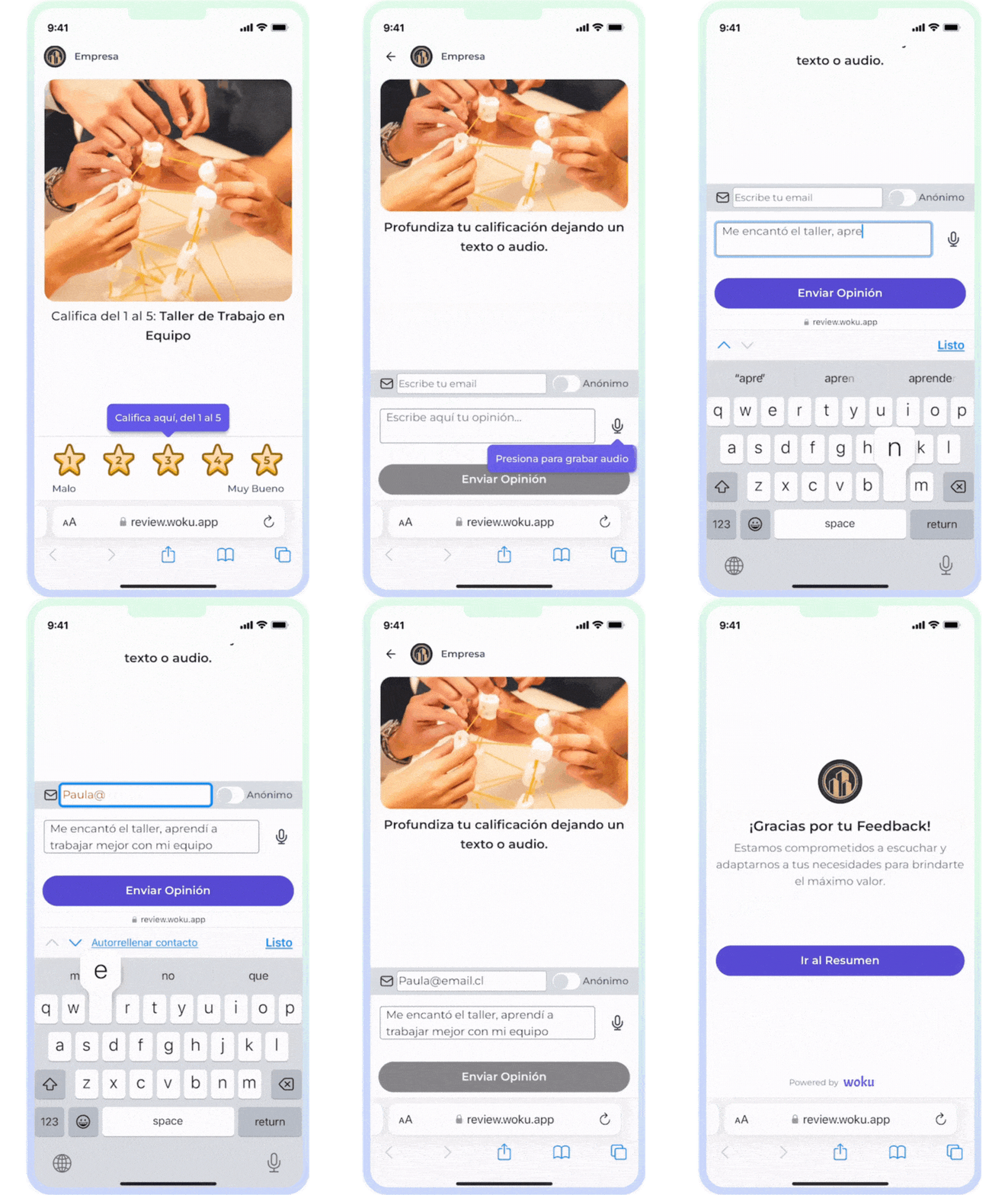
Rating a woku on the mobile interface.
Its strength is fitting into key moments of the journey and capturing feedback in real time. The customer takes less than two minutes, compared to the 15 or more of a traditional survey. In a woku the **comment is the heart**: it always accompanies the star to explain the why.
## NPS
**NPS** (Net Promoter Score) measures **loyalty and recommendation**. It is based on a single question: *how likely are you to recommend this company, product or service?*
The customer responds on a scale of **0 to 10** and is classified as:
* **Detractors** (0 to 6): dissatisfied customers who can slow down your growth.
* **Passives** (7 to 8): satisfied but not committed.
* **Promoters** (9 to 10): loyal customers who actively recommend.
The score is calculated by subtracting the % of detractors from the % of promoters: a number between -100 and 100. Unlike other NPS tools, in woku the customer can accompany their score with a **text or audio review**, identified or anonymous. That way you get the number and the why.
## CSAT
**CSAT** (Customer Satisfaction) measures **how satisfied** the customer was after a specific moment. The question is fixed and you only define the subject to evaluate: *"On a scale of 1 to 5, how satisfied are you with \{subject}?"*.
* **Scale of 1 to 5.** The score is **required**; the comment (text or audio) is **optional**.
* **Main metric:** the **average** of the scores. You will also see the **top-2-box**: the percentage of responses with 4 or 5, and the satisfied / neutral / dissatisfied distribution.
* It is answered in an **identified (by email) or anonymous** way.
It is ideal for the moment of sale or any point where the relevant question is simply *"were you happy?"*.
## CES
**CES** (Customer Effort Score) measures **effort**: how easy it was for the customer to accomplish what they came to do. The question is fixed and you only define the action: *"how easy was it to {action}?"*.
* **Scale of 1 to 5** (5 = very easy). Score **required**, comment **optional**.
* Same metric as CSAT: **average**, **top-2-box** and distribution.
* Identified by email or anonymous.
CES shines in **support, after-sales, onboarding, returns or procedures**: episodes where reducing friction matters more than delighting.
CSAT and CES are mirror images: same scale (1-5), same logic of required score and optional comment, same metrics. Only the question and what they measure change: **satisfaction** (CSAT) vs **effort** (CES).
## Flow
A **Flow** chains several wokus together in a single session, optionally preceded by an **NPS** as the first step. It works for experiences with multiple relevant moments that do not fit in a single question: an event (invitation, content, speakers, organization), an in-store purchase or a training session.
The customer opens a single link and moves forward with a progress bar ("1 of 4"). If the Flow includes NPS, that is the first step, to capture a clean reading before evaluating specific moments. The email is requested only once and reused across all the steps.
```mermaid theme={null}
flowchart LR
A[optional NPS] --> B[Woku 1] --> C[Woku 2] --> D[Woku 3] --> E[Thanks]
```
Each response is saved in its corresponding tool (the NPS in its NPS, each woku in its own), so your individual reports keep working, with the extra context that they came from the same customer in the same session.
## Forms
**Forms** captures **structured data**, not feedback. While a woku measures with stars and a review, a Form asks concrete questions with answers saved in defined fields: text, number, date, email, phone, single or multiple selection.
Use it when you need specific, verifiable data: company name, customer type, date of the experience, contracted service, event registrations.
The administrator chooses the fields, their order and which ones are required, and defines three rules: whether it allows anonymous responses, whether the customer identifies by email or phone, and whether they can respond only once. The response becomes available to download as CSV or consume from your system.
```mermaid theme={null}
flowchart LR
A[Design form] --> B[Configure rules] --> C[Share link or QR] --> D[Customer completes] --> E[Response saved]
```
Forms inherits what makes woku easy: same flow to create, share (QR, link, bulk send) and review, same clean experience for the customer and the same reports.